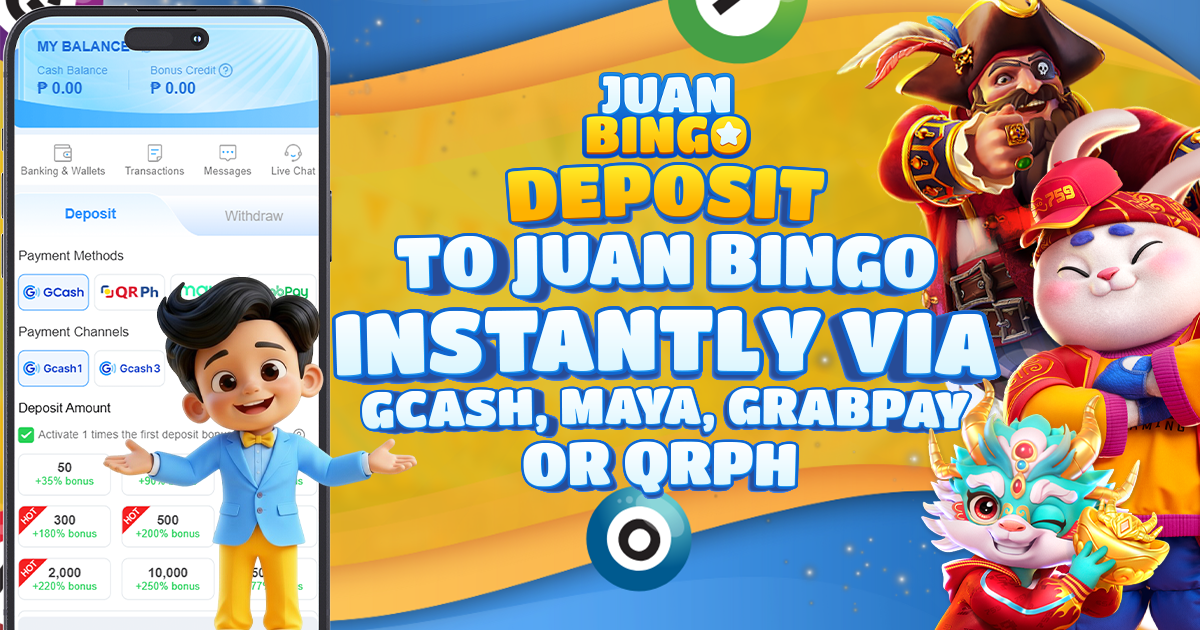

Depositing funds to your Juan Bingo account has never been easier. With just a few taps, you can fund your wallet using GCash, Maya, GrabPay, or any QRPh-enabled bank—all within a few minutes. The entire process is designed to be smooth, secure, and beginner-friendly, so you can focus more on playing and less on waiting.
Our advanced top-up system gives players full control and flexibility. Whether you’re using your smartphone or desktop, you can top up anytime, anywhere. Simply choose your preferred payment option, type in your desired amount, and confirm your transaction through our secure payment gateway.
Each payment goes through Juan Bingo’s official deposit page, ensuring your funds are processed safely and credited accurately. Once a new QR code is generated, open your GCash, Maya, GrabPay, or bank app, scan the code, and confirm your payment. That’s it—no complicated steps, no long queues. In minutes, your balance is ready for action.

Step-by-Step Juan Bingo Deposit Guide
Adding funds to your Juan Bingo account only takes a few steps. Follow this simple walkthrough to complete your deposit quickly and enjoy uninterrupted gaming:
Step 1: Access the Deposit Page
After logging in to your Juan Bingo account, head to the Deposit section. This is the only verified and secure page where you can make a valid deposit. Never attempt to deposit through third-party links or unofficial platforms to ensure the safety of your funds.
Step 2: Select a Payment Method
Choose between GCash, Maya, GrabPay, or QRPh (for participating banks that support QR payments). Both options are swift, reliable, and widely trusted in the Philippines.
Step 3: Input or Choose Your Deposit Amount
You may select from preset deposit amounts or type in a custom value. Always make sure your chosen payment account has sufficient balance before submitting your request.
Step 4: Submit Deposit Request
Once you confirm your details, click Submit. The system will automatically generate a unique QR code for your transaction. Each QR code is valid for a single use only to maintain security.
Step 5: Save or Screenshot the QR Code
Download or capture a clear screenshot of your generated QR code. You’ll need this code to finalize your payment via your selected e-wallet or bank app.
Step 6: Open Your Chosen Payment App
Open your GCash, Maya, or bank app, and tap Scan QR or Upload QR. Upload the QR code you just saved and follow the on-screen instructions to complete your payment.
Step 7: Wait for Confirmation
After payment, your deposit will be processed automatically. It usually appears in your Juan Bingo wallet within a few minutes. You’ll also receive a confirmation message once it’s successful.
Available Payment Options at Juan Bingo
Juan Bingo offers several trusted payment channels, giving you peace of mind with every transaction. Here’s how each method works:
GCash
The most popular e-wallet in the Philippines, GCash lets you fund your Juan Bingo account instantly. Just scan the QR code through your GCash app, confirm your payment, and your credits will reflect shortly after.
Maya (formerly PayMaya)
Prefer Maya? You can also top up seamlessly by scanning or uploading the QR code from your Maya app. It’s a fast, safe, and straightforward process—perfect for players who want instant access to the fun.
GrabPay (NEW!)
Juan Bingo also accepts GrabPay, offering players another flexible and secure cash-in option. Through the Grab app, you can seamlessly transfer funds to your Juan Bingo account. Just select GrabPay at checkout, approve the payment, and your deposit will reflect almost instantly.
QRPh for Bank Transfers
Juan Bingo supports QRPh, the national QR standard in the Philippines. This allows you to top up directly from major banks such as BPI, UnionBank, Metrobank, and more—as long as they support QRPh transactions. Simply scan your new QR code, confirm the payment in your bank app, and your deposit will be credited shortly.
Safe and Secure Transactions
At Juan Bingo, your safety is our top priority. All transactions are processed through encrypted, verified systems to protect your data and financial information. We never store your banking credentials, and every payment is monitored in real time for accuracy and security.
You can deposit with confidence knowing that your money is handled through trusted, officially certified payment partners.
Best Practices for a Hassle-Free Deposit
To avoid delays or failed transactions, here are a few reminders before you make a deposit:
- Always Generate a New QR Code: Each deposit requires a new QR code from the official Juan Bingo Deposit Page. Reusing an old QR code can lead to failed or delayed top-ups.
- Use Accurate Details: Double-check your top-up amount and payment method before confirming. Mistyped details may cause processing issues.
- Deposit Using Your Own Account: Always use your registered GCash, Maya, GrabPay, or bank account. Deposits from unregistered or third-party accounts may not be accepted.
- Ensure Sufficient Balance: Confirm that your wallet or bank account has enough funds to complete the transaction.
- Protect Your OTP and QR Code: Never share your One-Time Password (OTP) or top-up QR code with anyone. This ensures the safety of your account and your funds.
- Deposit Only Through Official Channels: To stay secure, always make top-ups directly through the official Juan Bingo website or app.
How to Fix Common Deposit Issues
Even with a seamless system, occasional hiccups can happen. Here’s how to fix common top-up concerns:
Deposit Not Reflecting Right Away
Wait at least 5–10 minutes, then check your transaction history. If it’s still not showing, verify that the QR code used was newly generated. If the issue continues, contact Juan Bingo Support with your transaction reference for verification.
Payment Declined or Failed
Ensure your payment account has enough balance and that your QR code is new and valid. Try regenerating a fresh QR code before retrying the process.
Wrong Amount Sent
If you accidentally sent the wrong amount, immediately contact our support team. Provide the reference number and payment details for faster resolution.
Error Message or Timeout During Payment
If your payment freezes or shows an error, please refrain from repeating the transaction immediately. Verify your e-wallet or bank app to confirm if payment went through before attempting again.
Old QR Code Used by Mistake
Old QR codes expire and cannot process new transactions. Always generate a new one from your top-up page before sending funds.
Why Deposit with Juan Bingo?
Depositing with Juan Bingo is more than just adding funds—it’s about enjoying a safe, convenient, and rewarding experience from start to finish.
- Lightning-Fast Transactions: Forget about long waiting times. With GCash, Maya, GrabPay, and QRPh, top-ups are processed in real time, so you can jump right into your favorite games without delay.
- Total Security and Privacy: Juan Bingo uses industry-grade encryption to protect all payment activities. Your data remains private, and every transaction is verified for authenticity.
- Flexible Payment Options: Enjoy the freedom to choose from three trusted payment methods widely used in the Philippines.
- 24/7 Availability: You can fund your account anytime—morning or midnight. Juan Bingo’s top-up system runs 24/7, so you can top up whenever the fun calls.
- Dedicated Customer Support: Our friendly support team is available round the clock to assist with any payment issues. Just share your transaction details, and we’ll resolve it as quickly as possible.
At Juan Bingo, we make sure your experience is smooth, secure, and satisfying—from your first deposit to your next big win.
Got Questions? We’ve Got Answers!
Q: What’s the minimum deposit amount on Juan Bingo?
A: The minimum amount depends on your chosen payment method. The limit will appear on the top-up Page before you confirm your transaction.
Q: How long will it take for my deposit to appear?
A: Deposits typically reflect within minutes. In rare cases, processing might take a bit longer due to network delays.
Q: Can I deposit using someone else’s account?
A: For security reasons, only use your registered GCash, Maya, GrabPay, or bank account. Deposits from third-party accounts may be rejected.
Q: Are there deposit fees?
A: Juan Bingo does not charge additional fees. However, some payment providers may have minimal transaction charges.
Q: What if my deposit doesn’t appear?
A: Wait a few minutes and recheck your transaction. If it’s still not showing, contact customer support with your payment reference.
Q: Can I reuse my QR code for future deposits?
A: No. Each QR code is valid for a single transaction only. Generate a new one every time you top up.
Q: Is it safe to deposit on Juan Bingo?
A: Absolutely! All payments go through our encrypted gateway and official partners, ensuring your money is safe and secure.
Final Thoughts
Depositing on Juan Bingo is simple, secure, and designed for your convenience. Whether you’re using GCash, Maya, GrabPay, or QRPh, your funds are processed safely and credited within minutes.
Always generate a new QR code for every transaction and top up only through the official Juan Bingo page to guarantee smooth and successful payments. With 24/7 processing, advanced security, and responsive support, you can fund your account anytime and dive straight into the fun.
Ready to play? Head over to your top-up Page, top up your wallet, and start your winning journey today—only with Juan Bingo, where secure deposits meet nonstop excitement!